Household · Recipes
How to Organize Recipes: One Place for Website Recipes, Cookbooks and Family Cards
Bookmarks, screenshots, a stained card from your grandmother and a cookbook full of sticky notes: most recipe collections are spread over six places. Here is how to bring them into one, keep them findable, and get from recipe to shopping list without retyping.
By Nico Jansen, maker of Tjatjie··15 min read
🇳🇱 Lees dit artikel in het Nederlands →🇩🇪 Diesen Artikel auf Deutsch lesen →🇫🇷 Lire cet article en français →🇪🇸 Leer este artículo en español →🇮🇹 Leggi questo articolo in italiano →🇵🇹 Ler este artigo em português (Portugal) →🇧🇷 Ler este artigo em português (Brasil) →
The short answer
To organize recipes, gather them from every place they are scattered, keep only the ones you cook, and move them into one home where each recipe has the same shape: name, servings, ingredients with amounts, steps and source. Sort them into a few categories that match how you search, and connect the collection to your shopping list so a recipe turns into groceries without copying.
The six steps:
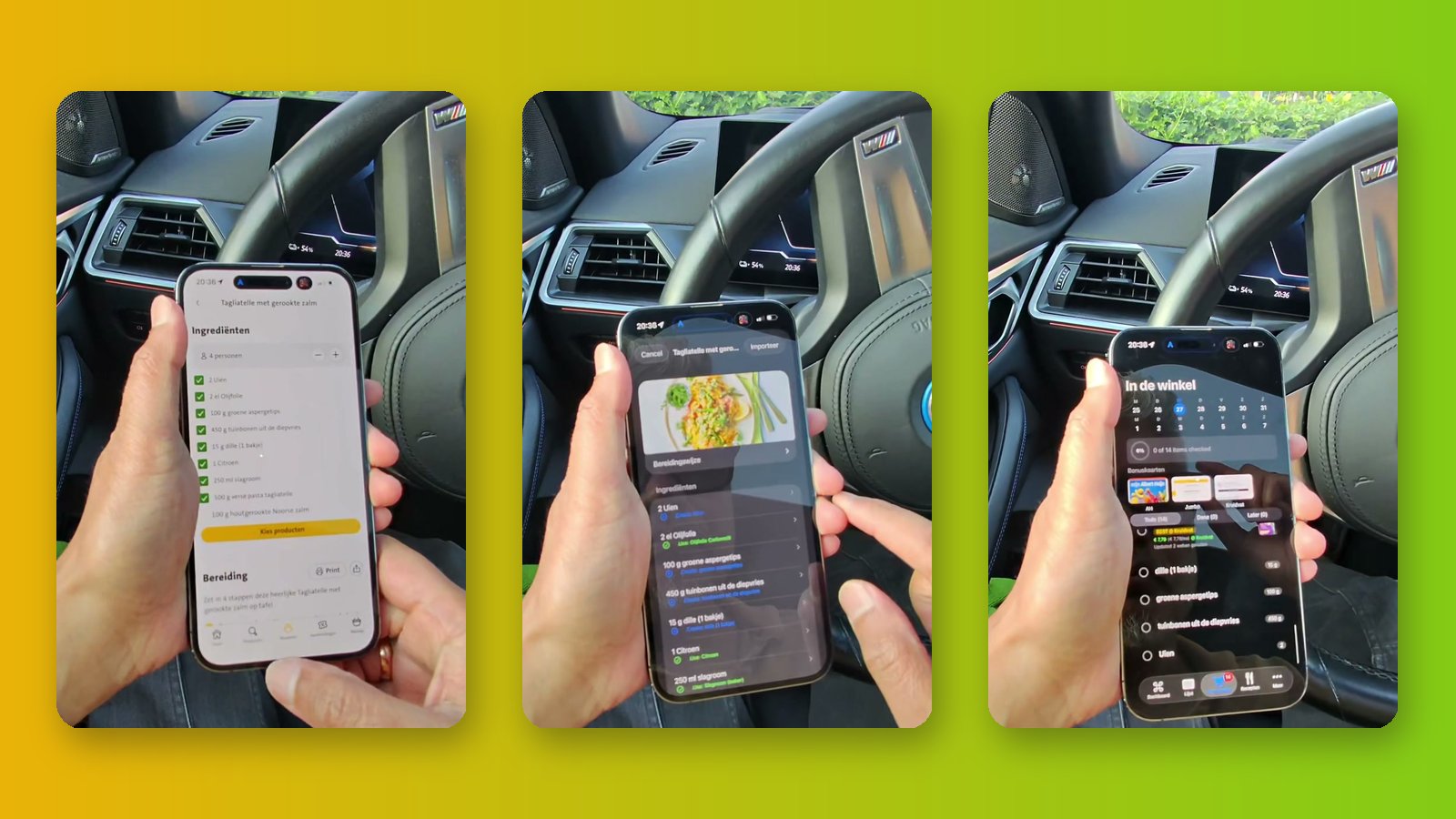
Typing recipes in by hand works fine. I did it for a long time. But every time I found a dish I wanted to cook on a supermarket’s recipe site, I caught myself copying the ingredients one by one onto the shopping list, and wondering why I couldn’t just copy the recipe itself. That question ended up as a feature in the grocery list app I build, and the pictures in this guide are from the short video I made of it: a tagliatelle with smoked salmon, from the website to the list.
But the copying is only the last step of a bigger mess. Ask anyone who cooks where their recipes are, and the honest answer is “everywhere”. A few in the browser’s bookmarks, a lot in the photo library as screenshots, some on a social app, a shelf of cookbooks, a folder of printouts, and the one recipe that matters most on a card in a drawer.
This guide is about turning that into one collection you actually use. It does not require a particular app. A binder works. What it requires is a few decisions: what to keep, where it lives, what every recipe looks like, and how it gets to the shopping list.
What does it mean to organize your recipes?
An organized recipe collection is one where every recipe you cook lives in one place, looks the same, can be found in under a minute and can be turned into a shopping list without retyping. That is the whole goal. Pretty binders and color-coded tabs are optional.
Four things make a collection work in practice:
- One place. When a recipe can be in six places, you search all six or give up and cook the usual. One home removes that.
- One shape. A recipe with servings, amounts and steps in the same order every time is quick to read while cooking and quick to shop from.
- Findable. A few categories, or a search box, that match how you think about food when you are choosing what to make.
- Connected to the shopping. A recipe is only useful if its ingredients are in the house. The shorter the road from recipe to list, the more often you cook from the collection.
Where do recipes get lost?
Recipes get lost in the places where saving is easy and finding is hard: bookmarks, screenshots, saved social posts and chat messages. Each source has its own way of failing:
| Where the recipe is | What goes wrong | What to do with it |
|---|---|---|
| Browser bookmarks | Links break when a site moves or closes; the bookmark has no ingredients in it | Save the recipe itself, keep the link as the source |
| Screenshots | Buried between thousands of photos; often cut off halfway through the ingredients | Make an album, then move the keepers into the collection |
| Saved posts and recipe videos | The recipe is in a caption or spoken in the video, not written down | Write the ingredients and steps out once |
| Group chats and email | Impossible to find back after a week | Copy into the collection the day you receive it |
| Cookbooks | You remember a dish but not which book it was in | Keep an index entry: dish, book, page |
| Handwritten cards and printouts | One copy, fading, near the stove | Photograph or scan; keep the original safe |
Notice that every fix is a variation of the same move: get the actual recipe, not a pointer to it, into the one place you use.
How to organize recipes in 6 steps
Organizing a recipe collection takes six steps: gather, cull, choose a home, give every recipe the same shape, sort the way you search, and connect the recipes to your shopping list. The first round takes an evening. After that, it is a minute per new recipe.
1. Gather every recipe in one pile
Go through every place from the table above. Export or list your recipe bookmarks, scroll the photo library for screenshots, open the saved posts on the social apps you use, search your chats and mail for “recipe”, and pull the cards and printouts out of the drawer. Put cookbooks with marked pages on the table. You don’t organize anything yet. You just want to see how much there is.
2. Keep only what you cook or really want to try
Most collections are mostly recipes nobody will cook. Sort quickly into three piles: recipes you make, recipes you want to try in the coming months, and the rest. Be honest about the third pile: a recipe saved four years ago and never opened is not going to be cooked. Family recipes always stay, whatever pile they would otherwise be in.
3. Choose one home for all of them
Pick the place where every recipe lives from now on. The options are compared in the next section, but the rule matters more than the choice: one home. If you keep a binder for the classics and an app for new recipes, sooner or later you are searching both. Paper originals can stay where they are, as long as a copy lives in the home.
4. Save every recipe in the same shape
Every recipe gets the same parts, in the same order:
- A name you would search for. “Grandma’s apple cake”, not “Cake (2)”.
- Servings. So you know whether to double it.
- Ingredients with amounts, one per line. This is the part that becomes the shopping list, so “2 onions” beats “some onion”.
- Steps, numbered and short.
- The source: the link, the book and page, or the person it came from.
- Your notes: “less sugar”, “needs 10 minutes longer in our oven”, “the kids loved it”.
The ingredient list with amounts is the most important part. It is what you check against the cupboard and what you shop from. A recipe app that imports from a website does most of this for you.
5. Sort the way you search
Think about the moment you open the collection. Are you asking “what is quick tonight?”, “what do I do with this chicken?” or “what do I bake for Sunday?” Your categories should answer that question. Keep the number small, and add one mark for recipes you have actually made and would make again. More on this below.
6. Connect your recipes to the shopping list
The last step is the one that decides whether the collection gets used. If cooking from it means copying ten ingredients onto a list by hand, you will cook from it less often. Pick a home where the ingredients go to the shopping list with as little work as possible, and make sure it is the same list the rest of the household adds to.
Binder, notes app or recipe app: which home fits?
The best home for your recipes is the one you already open while cooking and while shopping; paper is best for keeping, an app is best for finding and shopping. This is how the usual options compare:
| Home | Strong side | Weak side |
|---|---|---|
| Binder with sheet protectors | Lasts, no screen in the kitchen, nice for family recipes | Not with you in the store; no search; adding a web recipe means printing it |
| Recipe box with cards | Simple, and a good way to keep handwritten recipes together | Same as the binder, and fills up fast |
| Notes app (Apple Notes, Google Keep, OneNote) | Already on your phone, searchable, can be shared | Every recipe is copied by hand; ingredients are not linked to a list |
| Documents or a spreadsheet | Full control, easy to back up | Hardly ever opened on a phone in the kitchen |
| Dedicated recipe manager (Paprika, Mela and others) | Imports from websites, categories, scaling, cooking view | Often a separate list from the one the household shops from |
| Grocery list app with recipes | Ingredients go straight to the shared shopping list | Less of a library: fewer tools for big collections |
If you have hundreds of recipes and love browsing them, a dedicated recipe manager is built for that. If you have a few dozen recipes you rotate and the hard part is getting their ingredients into the house, keeping them next to the shopping list saves more time. Many people combine a binder for the family heirlooms with an app for everyday cooking. That is fine, as long as the heirlooms also have a digital copy in the app.
How should you sort your recipes?
Sort recipes the way you search for them, using about eight to twelve categories, and mark the ones you have made and would make again. There are three common ways to sort, and most collections use one as the main system:
| Sort by | Example categories | Works best for |
|---|---|---|
| Meal or course | Breakfast, weeknight dinner, weekend cooking, soup, salad, baking, dessert | Most households; matches “what do we make tonight?” |
| Main ingredient | Chicken, beef, fish, vegetarian, pasta, rice, eggs | People who shop by offer or cook from what is in the fridge |
| Occasion | Quick, guests, holidays, birthdays, freezer meals | Big collections with a lot of special-occasion cooking |
Tips that keep sorting simple:
- Fewer categories than you think. If you hesitate where a recipe goes, you have too many. Twelve is plenty for a few hundred recipes.
- Tags beat folders in an app. A tag lets the same lasagna be “pasta” and “freezer meal” at once. In a binder, pick the category you would look in first.
- A “made it” mark. The most useful sort of all is “cooked, liked, would make again”. That list becomes your rotation.
- A “to try” spot. New recipes wait there until you have cooked them once. If they were good, they move into the collection. If not, they go.
How do you save a recipe from a website?
Save the recipe itself, not a bookmark: import it into a recipe app or a list app from the link, or copy the ingredients and steps into your collection, and keep the link as the source. A bookmark is a promise that the page will still be there, with the same recipe, when you need it. That promise is often broken.
Recipe pages are long because of the story, the photos and the ads above the actual recipe. You have a few ways to get past that:
- Import from the link. Most recipe sites describe their recipes in a standard, machine-readable format (schema.org Recipe), which is what lets apps pull in the ingredients and steps from a pasted link. This is the fastest way, and it keeps the amounts right.
- Use the recipe card or print button. Many recipe sites have a “jump to recipe” link and a print view with only the recipe. Copy from there.
- Reader view. Safari’s reader view strips most of the page down to text, which makes copying easier.
- Check the import. Whatever tool you use, glance over the ingredient list once. Amounts like “1 (14 oz) can” or a missing ingredient from a separate “for the sauce” section are where imports go wrong.
A recipe from a site in another language is worth saving too. A translated copy in your collection is easier to cook from than a foreign page you have to translate at the stove.
How do you keep family recipe cards safe?
Make a digital copy of every family recipe card, store that copy in two places, and keep the original dry, out of the light and away from the stove. A handwritten card is a recipe and a keepsake at once. The recipe can live in your collection. The card deserves a box.
- Photograph or scan both sides. Daylight from a window, no flash, phone held flat above the card. Notes on the back are often the best part.
- Type the recipe out too. A photo preserves the handwriting; a typed copy can be searched, scaled and put on a shopping list. Keep the photo attached to the typed recipe.
- Translate the vague parts while you still can. “A cup” might be her blue cup, “a knob of butter” might be 30 grams, “bake until done” might be 40 minutes. Ask, and write it down next to the original wording.
- Write down where it came from. Who wrote it, roughly when, and for which occasion it was made. That turns a recipe into family history.
- Store the original properly. An acid-free sleeve or box, away from the stove, the sink and direct sunlight. Don’t laminate originals: lamination cannot be undone and can damage the paper over time.
If the old recipes come in a box with old photos, the same care applies to those. I wrote a separate guide on how to organize and digitize old family photos.
How do recipes end up on the shopping list?
Recipes end up on the shopping list when you go through the ingredients, take off what is already in the house and add the rest to the one list your household shops from; an app can make that a single tap. This is where an organized collection pays off, or where it quietly stops being used.
Three things make the step reliable:
- Amounts on every ingredient. “Tomatoes” is not enough when two recipes need them. Step 4 already took care of this.
- A check against the cupboard. The third jar of cumin comes from skipping this. Tick off what you have before you shop.
- One list for everyone. If the recipe ingredients are on your list and the milk your partner noticed is on theirs, someone is going back to the store. I wrote a separate guide on how to share a grocery list with your family.
It also works the other way round. When the fridge holds half a bag of spinach and some feta, the useful question is “which of my recipes use these?” A collection you can search by ingredient answers that, and less food goes to waste. If you cook for the week ahead, the next step is a plan, and I wrote a guide on how to meal plan for the week as well.
How do you keep the collection from getting messy again?
A recipe collection stays tidy when every new recipe goes straight into the one home, gets a verdict after the first time you cook it, and the collection gets a short clean-up every few months. The mess returns the moment saving becomes easier somewhere else.
| Habit | Why it helps |
|---|---|
| Save new recipes only in the home, never as a bookmark or screenshot | Nothing starts a new pile |
| New recipes go to “to try” first | The main collection only holds recipes that worked |
| Write one note after cooking | Next time you know what to change, and whether to make it at all |
| A 15-minute clean-up every season | Remove what you never cook, fix broken links, sort the “to try” spot |
| A backup or sync to a second device | A lost phone or a broken laptop does not take the collection with it |
The note after cooking is the habit that makes the biggest difference. A recipe with “double the garlic, 15 minutes is enough” in it is a recipe that is yours, and it is the one you will cook again.
Recipes and the shopping list in one place with Tjatjie
I built Tjatjie as the grocery list for our own household, and the recipes went in because cooking always ends on the shopping list. It is a shared grocery list for iPhone, iPad and Mac, and this is what it does for the steps above:
- Recipes in, without retyping. Type a recipe in by hand, paste a link to a recipe website, or take a photo of a recipe from a cookbook or a card, and Tjatjie brings in the ingredients.
- Recipes from abroad. An imported recipe in another language can be translated automatically, so it lands in a language you read.
- From recipe to list in one tap. Pick what you are cooking and one tap adds its ingredients to your shopping list. You can also find recipes that use what is already on your list.
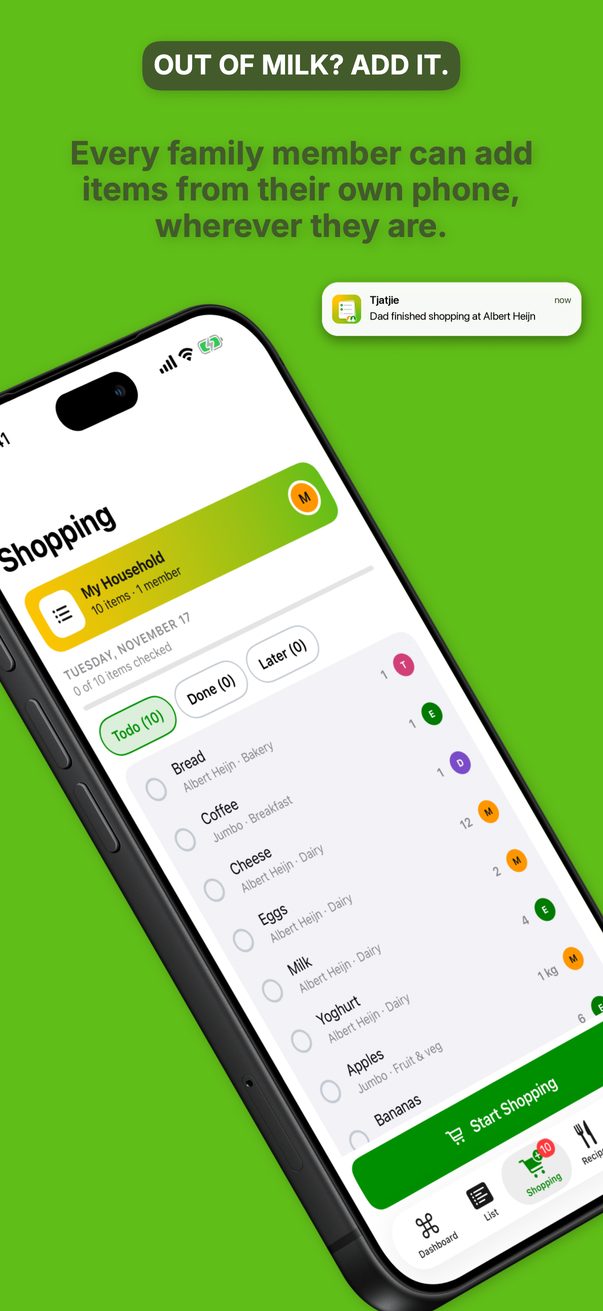
- Shared with the household. Lists and recipes sync between your devices and your household through your own iCloud. Everyone you invite adds items from their own device, and the others get a notification when someone adds an item, starts shopping or finishes.
- In the store. Give items a quantity, a note or a photo, order the list by your route through the shop, and keep checking items off when the signal is bad: the list works offline.
Where it does not fit: Tjatjie is a grocery list with recipes, not a recipe library for hundreds of recipes; if browsing a big collection is what you want, a dedicated recipe manager is built for that. Tjatjie is not available on Android or the web. And the app is unlocked with a Tjatjie Pro subscription that you choose after installing. The App Store page has the details.
Frequently asked questions
What is the best way to organize recipes?
Keep every recipe in one place, save each one in the same shape (name, servings, ingredients with amounts, steps, source), and sort them into a handful of categories that match how you search. Which place you choose, a binder, a notes app or a recipe app, matters less than having only one.
How do I organize recipes from websites?
Save the recipe itself, not a bookmark. Use a recipe app or a list app that imports from a link, or copy the ingredients and steps into your own collection, and always keep the link to the original as the source. Bookmarks break when a site moves or closes.
How do I organize recipe screenshots on my iPhone?
Move them out of the camera roll. Make an album for recipe screenshots as a first step, then go through it once and type or import the recipes you really cook into your recipe collection. Delete the screenshots you have not looked at in a year.
What categories should I use for recipes?
Use categories that match how you look for a recipe: by meal (breakfast, weeknight dinner, baking), by main ingredient (chicken, fish, vegetarian) or by occasion (guests, holidays). Keep it to about eight to twelve, and add a mark for recipes you have made and would make again.
How do I preserve old handwritten family recipes?
Photograph or scan each card in good light, store the digital copy in two places, and keep the original in an acid-free sleeve away from the stove. Do not laminate originals. Write down who the recipe came from and what any vague measures mean, while someone still remembers.
Is it better to keep recipes on paper or digitally?
Most households end up with both: paper for the family cards and the cookbooks you love, digital for everyday cooking because it is searchable, on every phone and easy to turn into a shopping list. A digital copy of the paper recipes protects them if the original gets lost.
How do I share a recipe collection with my partner or family?
Choose a home that syncs between your devices, such as a shared notes folder, a recipe app with sync or a grocery list app that shares recipes with the household. A binder on the kitchen shelf also works, as long as everyone knows it is the one place.
Which app turns saved recipes into a shared shopping list on iPhone?
Tjatjie is a shared grocery list for iPhone, iPad and Mac with recipes built in. You type a recipe in, or import it from a website link or a photo of a cookbook page or card, and an imported recipe in another language can be translated. One tap adds the ingredients to the shopping list the household shares, and recipes sync through your own iCloud. Tjatjie is unlocked with a Tjatjie Pro subscription and is not available on Android or the web.