Events · Memories
How to Keep Track of the Concerts and Games You’ve Been To: 6 Ways Compared
The paper stub is gone and the e-ticket vanishes after the show. Here are six ways to keep a record of every concert, game and festival you went to, what to write down, and how to rebuild the years you never logged.
By Nico Jansen, maker of TixVault··16 min read
🇳🇱 Lees dit artikel in het Nederlands →🇩🇪 Diesen Artikel auf Deutsch lesen →🇫🇷 Lire cet article en français →🇪🇸 Leer este artículo en español →🇮🇹 Leggi questo articolo in italiano →🇵🇹 Ler este artigo em português (Portugal) →🇧🇷 Ler este artigo em português (Brasil) →
The short answer
To keep track of the concerts and games you have been to, keep one list with the date, the event and the venue of each one, and add the ticket, a few lines and a few photos within a day of the event. The list can be a box of stubs, a spreadsheet, a journal app, a concert or match database, or a ticket diary app; the one that works is the one where the ticket, your words and your photos end up in the same place.
The five steps:
Somebody asks how many times you have seen that band. Or which year it was that your team won the derby in the last minute, and who was sitting next to you. You were there. You paid for the ticket. And you are not sure.
It used to be easier. A ticket was a piece of card, the steward tore it, and the half you kept went into a drawer or a shoebox. Nobody planned that archive. It simply built up, one stub at a time.
Today the ticket is a PDF in your inbox or a code in an app, and after the event it is gone or buried. The photos are somewhere in a camera roll of thousands. This guide is about putting that back together: the ways to keep a record, what is worth writing down, and how to recover the events you never noted.
Why do the events you go to fade so fast?
Events fade because nothing keeps them together any more: the ticket, the photos and the story of the night each end up in a different place, and none of those places is made for looking back. The paper stub did that job by accident. Its digital replacement does not.
Look at where the pieces of one evening go:
- The ticket sits in an email, a downloads folder or a seller’s app. After the event nobody opens it again, and an app may stop showing it.
- The photos are in your camera roll, between receipts and holiday pictures, without the name of the event on them.
- The facts, such as the score or the support act, are on the internet, as long as you remember what to search for.
- The story, who was there and what happened to you, is only in your head, and that is the part that goes first.
The details you most want later are the ones nobody else recorded. A website can tell you the final score in ten years. It cannot tell you that your daughter saw her first match that day, or that the train home was cancelled and you walked.
So keeping track is less about statistics than about one habit: bringing those four pieces together soon after the event, in a place you will still have in ten years.
What are the ways to keep track of concerts and games?
There are six common ways to keep track of the events you attend: a box or album of paper stubs, a spreadsheet or notes file, a journal app, a concert or match database, a photo album per event, and a ticket diary app. They differ in what they hold, how much work an entry is, and who can see it.
| Way | What it holds | Work per event | Strong point | Weak point |
|---|---|---|---|---|
| Stub box or scrapbook | The paper ticket, and what you stick next to it | Low to high | The real object in your hands | Fewer and fewer tickets are paper |
| Spreadsheet or notes file | Date, event, venue and any column you add | Low | Sorts, counts and exports the way you like | No ticket, no photos |
| Journal app | Text and photos per day | Medium | Made for writing and looking back | Events sit between all your other entries |
| Concert or match database | The event from a shared database, with set lists or results | Low | Facts and statistics filled in for you | Needs an account; little room for your own story |
| Photo album per event | Your photos and videos | Low | Already on your phone | No date list, no notes, no ticket |
| Ticket diary app | The ticket itself, plus notes and photos | Low | The entry starts from the ticket you already have | Depends on the app which tickets it takes |
The stub box and the scrapbook
If you still get paper tickets, keep them. Nothing digital matches a stub from twenty years ago. A scrapbook adds what a box lacks: order, and room to write next to the ticket. The limit is supply. Most tickets now arrive on a screen, so a paper-only archive stops growing.
The spreadsheet
A spreadsheet is the choice of people who like lists. One row per event, with columns for the date, the artist or the two teams, the venue, the city, who you went with and a rating. It answers “how many times have I seen them” in a second. It holds no ticket and no photos, so it is an index more than a memory.
A journal app
Apple’s Journal app, on the iPhone since iOS 17.2, and apps such as Day One are made for entries with text and photos. They are good at the story. The drawback is that a concert is one entry among your holidays and ordinary Tuesdays, so “all matches of last season” takes tagging discipline.
Concert and match databases
For concerts, setlist.fm lets you mark the shows you attended and builds statistics from them, such as how often you saw an artist and which venues you visit most. Concert Archives is a database and diary in one, where you add the concerts and festivals you went to and can attach photos and notes. For football, Futbology, formerly called Groundhopper, logs matches and grounds from its own fixture lists.
These services are strong where your memory is weak: exact dates, set lists, line-ups and results. They ask for an account, and your history lives on their servers. Check what a service shows publicly before you add ten years of evenings to it.
A photo album per event
Making an album in Photos for each event costs a minute and uses pictures you already have. It shows what the night looked like. It does not tell you the date at a glance, the seat, or anything you did not photograph.
A ticket diary app
A ticket diary app starts from the ticket. You import the ticket before the event because you need it at the gate, and afterwards the same entry takes your notes and photos. The record builds itself as a side effect of going, much like the shoebox did.
These ways combine well. Plenty of people use a database for the statistics and a private diary for the story.
What should you write down for each event?
For each event, write down the date, the event and the venue, then the three things you cannot look up later: who you were with, what happened to you, and how it felt. Everything else is optional, and it differs per kind of event.
| Kind of event | The facts | Worth adding | What you forget first |
|---|---|---|---|
| Game or match | Teams, competition, final score | Scorers, your seat, the weather | Who sat next to you and what was sung |
| Concert | Artist, tour, venue | Support act, opening and closing song | Where you stood and the moment that got to you |
| Festival | Name, day or days, place | The acts you really saw, in order | The act you found by accident |
| Theatre or show | Title, company or cast, theatre | Your seat, the understudy who played | The scene you talked about on the way home |
Keep it short. Three lines written that evening are worth more than a page you planned to write and never did. A useful test: would this sentence be in a newspaper report? If yes, you can look it up later. If no, write it down now.
Some prompts that work for any event:
- Who was I with, and whose idea was it?
- Where did we sit or stand, and what could we see?
- What is the one moment I will tell someone about tomorrow?
- What went wrong? The queue, the rain, the missed train.
- Would I go again?
How do you rebuild the list of events you already went to?
You rebuild your history from the traces every ticket purchase leaves: confirmation emails, order histories at ticket sellers, dated photos, calendar entries and bank statements. One evening of searching usually recovers most of the last ten years.
- Search your email. Try “ticket”, “tickets”, “order confirmation” and “your order”, and the names of the sellers and venues you use. If you have had the same address for years, this finds the most.
- Open your seller accounts. Ticket sellers usually list past orders in your account. Write down the date and venue, and download any PDF that is still offered.
- Walk through your photos. The Photos app sorts by date and can show pictures on a map. A dark picture of a stage with a date on it is evidence.
- Check your calendar. If you put events in a calendar, scroll back year by year.
- Search your bank statements. Many banks let you search years of transactions by name. A payment to a ticket seller gives you the month.
- Confirm with a database. You know it was that band, in spring, in that city. A tour list on setlist.fm or a results site gives you the exact date.
- Ask the people you went with. A message to the group chat brings back events, and usually a photo or two as well.
Do not try to complete every entry in one go. First make the bare list: date, event, venue. That list is the hard part, and it is valuable on its own. Notes and photos can follow when you feel like an evening of looking back.
And accept gaps. An entry that says “around 2009, exact date unknown, with my brother” is better than no entry.
What do you do with old paper ticket stubs?
Scan or photograph old ticket stubs first, then store the originals flat, cool, dark and dry, because many of them are printed on thermal paper that fades. Thermal paper is the smooth, slightly shiny paper of till receipts, and box-office printers have used it for decades.
Thermal print is not ink. The paper has a coating that turns dark when heated, and that reaction slowly undoes itself. Heat, sunlight, friction and contact with some plastics and adhesives speed it up. That is why a stub from the back of a wallet can be a blank card.
| Do | Why |
|---|---|
| Scan or photograph each stub now | The image keeps what the paper is losing. |
| Store them flat in a cool, dark, dry place | Heat and light are what fade thermal print. |
| Keep tape and glue off the printed side | Adhesives can react with the coating. |
| Handle them by the edges | Skin oils and friction wear the print. |
| Write the event on the back in pencil if the print is going | A faded stub with no name is only a piece of card. |
For the scan, a phone is enough. Lay the stub on a plain, dark surface in daylight, away from the window, hold the phone parallel to it and fill the frame. The document scanner in the Files or Notes app straightens the edges for you.
Older tickets printed with ink on card, and the colour tickets clubs and promoters used to post out, last far better. They deserve a sleeve or an album page all the same.
How do you keep a digital ticket as a keepsake?
To keep a digital ticket as a keepsake, save your own copy before the event: download the PDF, or take a screenshot of a ticket that exists only inside an app. After the event the seller has no reason to keep showing it to you.
| Kind of ticket | How to keep it | Keep in mind |
|---|---|---|
| PDF or print-at-home ticket | Save the file itself, named by date and event | It is the complete original, with seat and entrance |
| Ticket in a seller’s or club’s app | Take a screenshot before the event | With a refreshing barcode the picture is a memento only; it does not scan |
| Pass in Apple Wallet | Leave it; Wallet moves it to its expired passes | It shows the pass, and nothing about the night |
| Paper ticket | Scan or photograph it, keep the original | Thermal print fades |
One warning belongs here. A ticket is proof of entry until the event is over. Do not post a picture of a ticket with a readable barcode before the event, and do not send it to people who are not going with you. Afterwards the code is worthless and the picture is only a souvenir.
A saved ticket is also the best index entry you can have. It carries the date, the start time, the venue, the section, the row and the seat. That is half of your diary entry, already filled in.
How to start an event diary in 5 steps
Starting an event diary takes five steps: choose one place, save the ticket, rebuild the past, write three lines within a day, and add a few photos. The first three you do once. The last two are the habit.
1. Choose one place for the whole record
Pick from the table above, and pick one. The question to ask is where the ticket, the words and the photos can sit together. If the answer needs two tools, say a database for statistics and a diary for the story, decide which one is the record and which one is the extra.
2. Save the ticket before it disappears
From now on, every ticket gets saved on the day it arrives. The PDF as a file, the app ticket as a screenshot, the paper ticket as a scan. You need it at the gate anyway, so it is no extra work, and it gives every future entry its date and place.
3. Rebuild the events you already went to
Take one evening for the search described above. Start with the last two years, where the traces are fresh, then work backwards. Enter the bare facts only. Stop when it stops being fun; the list will still be there next week.
4. Write three lines within a day
The result or the highlight. Who you were with. One detail. Write it on the way home or the next morning. After a week the evening has shrunk to “it was good”, and that is not worth writing down.
5. Add a few photos and look back once a year
Choose up to six photos and put them with the entry. Then, once a year, at the end of the season or in the last week of December, scroll through the whole list. Fill in a missing score, add the photo someone sent you later. This is also the moment the diary pays you back.
How do you keep the diary going?
A diary keeps going when an entry takes less than two minutes and is tied to something you do anyway, such as the journey home or the morning coffee after. Diaries stop because the entries were too ambitious, not because people lose interest.
- Set the bar low. Three lines count. One line counts. A score and a name count.
- Fix the moment. In the train, in the car park while the traffic clears, or the next morning. Not “sometime this week”.
- Choose photos the next day. On the night you take forty. The next day you can see which five matter.
- Do not rate everything. Stars make you compare evenings that have nothing to do with each other. Words age better.
- Write the bad ones too. The nil-nil in the rain and the concert with the broken sound are the entries you will enjoy most later.
- Missed one? Skip it. Add the bare facts and move on. A gap in the notes is no reason to stop the list.
If you put events in your calendar when you buy the ticket, you get a reminder before the event for nothing. Some people add a second one for the morning after, called “write it down”.
How do you keep a diary with the people you went with?
To keep a shared record, agree on one place that everyone in the group can see and add to, and let each person add their own lines and photos to the same event. An evening has as many versions as there were people, and the best photo is always on someone else’s phone.
- Family or household. One shared record for everything you go to together. In ten years it is the list of every show you took the kids to.
- Season-ticket group. The same seats every other week, with changing guests. Note who came, and the season becomes a story as well as a table of results.
- Concert friends. A shared album or a shared diary means the photos get collected once, the day after, and not requested one by one a year later.
Whatever you share, check who can see it. A shared album or document that is open to anyone with the link is something else than a record shared by invitation with four people.
From ticket to memory with TixVault
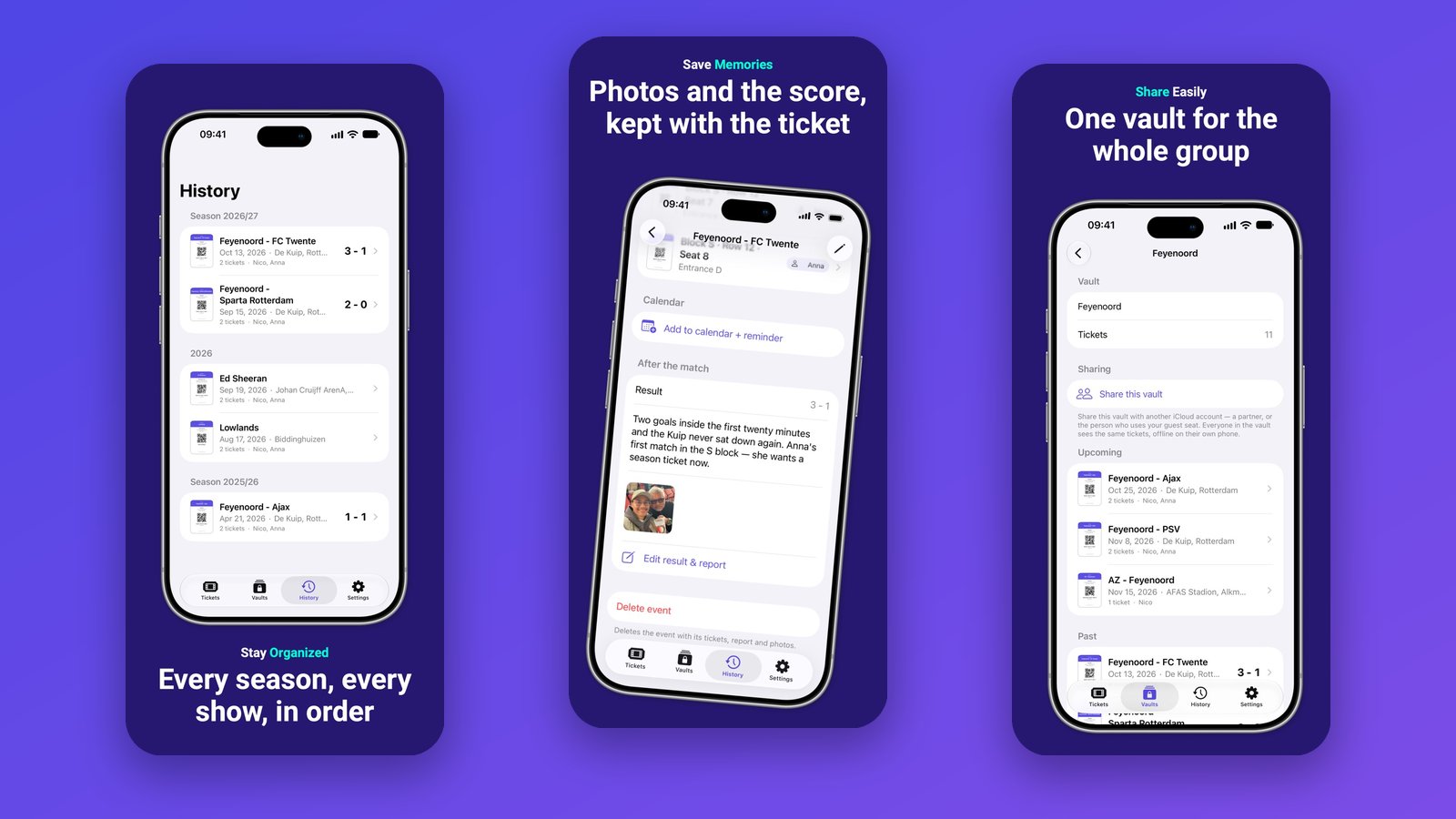
I built TixVault as a ticket wallet that does not end at the turnstile. A used ticket is usually deleted or forgotten; here it becomes the page where the night is kept. It runs on iPhone and iPad, and this is how it handles the steps above:
- The entry starts from the ticket. Import the PDF from Files, a screenshot from Photos, or paste it from the clipboard. TixVault reads the event, date, venue, section, row, seat and entrance on the device, and you check the scan before it is saved.
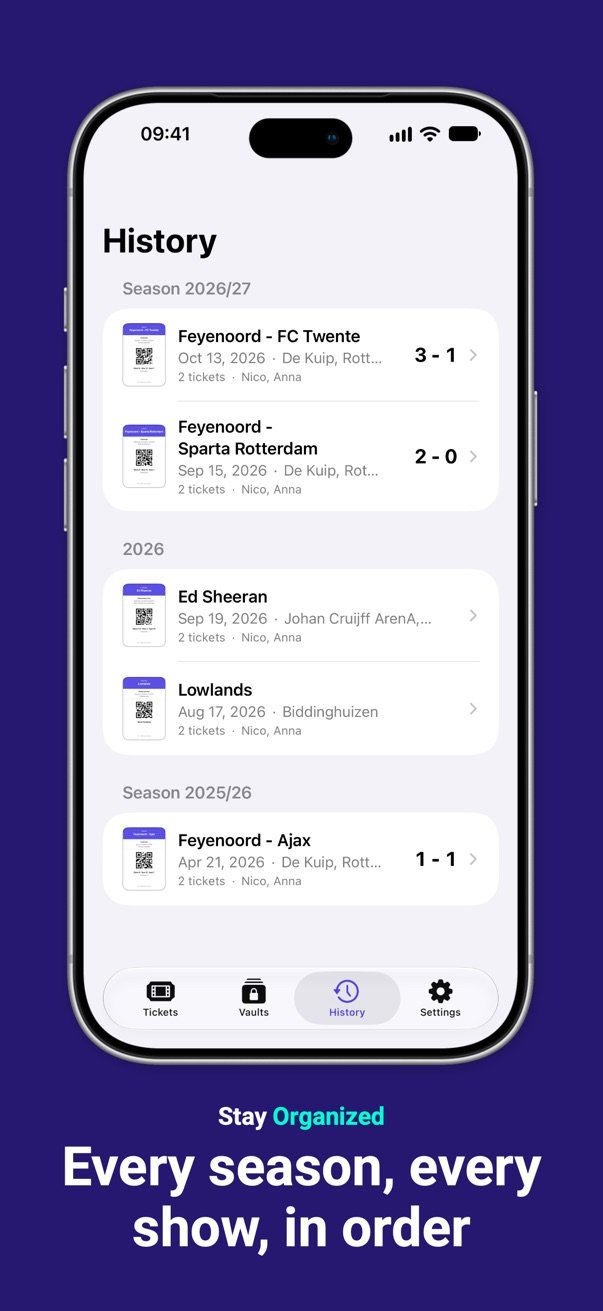
- It moves to History on its own. Three hours after the start, the event leaves the Tickets list and appears in History. The ticket is still there and can still be shown.
- The result and how it was. Fill in the score of a match, and for every event write a few lines while it is fresh: who was there, what was sung, what went wrong.
- The photos, with the ticket. Add the photos from that night, six at a time. They sit next to the ticket and not somewhere in a camera roll of thousands.
- A shelf of seasons and years. History groups matches per season, from July to June, and everything else per year, newest first.
- Who used which seat. Every ticket has a guest name, so the season-ticket holder can see later who came along.
- One shelf for the household. Share a vault through iCloud, by invitation, and everyone in it sees the same tickets, reports and photos.
- The original, always. Every ticket keeps its PDF or screenshot, so the stub stays on the page.
Your tickets, reports and photos are stored on your device and in your own iCloud account. There is no niApps account, there are no ads, and nothing is kept on a server of mine.
Where it does not fit: TixVault is a private diary, not a public database. The story of the night is what you write yourself. It takes tickets you have as a PDF or an image; barcodes that refresh inside an official ticketing app cannot be stored as a working ticket. The match season runs from July to June, which suits most football leagues and not every sport. And it runs on iPhone and iPad only, with no Android or web version.
Frequently asked questions
How do I keep track of the concerts I have been to?
Keep one list with the date, the artist and the venue of every show, and add a few lines and photos while the night is fresh. The list can be a notebook, a spreadsheet, a journal app, a concert database such as setlist.fm or Concert Archives, or a ticket diary app that keeps the ticket with the entry. What matters most is that everything is in one place and that you add each show within a day.
Is there an app to track the games or matches I have attended?
Yes, several. Futbology, formerly called Groundhopper, logs football matches and the stadiums you have visited from its own fixture database. A journal app or a spreadsheet works for any sport. A ticket diary app such as TixVault keeps the original ticket, the result, a report and your photos together for each match.
How can I find out which concerts I went to years ago?
Start with your email: search for words like ticket, order and confirmation, and for the names of ticket sellers. Then check the order history in your ticket seller accounts, your photo library sorted by date, your calendar and your bank statements. Sites such as setlist.fm let you look up an artist’s tour dates to confirm the exact date and venue.
What should I do with old ticket stubs?
Scan or photograph them first, because many stubs are printed on thermal paper that fades with heat, light and time. Then store the originals flat in a cool, dark, dry place, without tape or glue on the printed side. Once scanned, the image can go into a digital diary next to your notes and photos.
Can I keep a digital ticket as a souvenir?
Yes, if you save it in time. Download the PDF and keep the file, or take a screenshot of a ticket that only exists in an app before the event starts. A screenshot of a ticket with a refreshing barcode is a keepsake only; it does not scan at the gate.
What is the best thing to write in a concert journal?
The facts that a search engine cannot give you later. Who you went with, where you stood or sat, the song or moment that stayed with you, what went wrong, and how you got home. The set list and the tour dates can be looked up; your own evening cannot.
How many photos should I keep from an event?
A handful. Five or six photos that show the venue, the people you were with and the moment itself bring the night back better than sixty near-identical shots of the stage. Choose them the next day and keep them with the entry for that event.
Which iPhone app keeps tickets together with photos and notes from the event?
TixVault is a ticket wallet and event diary for iPhone and iPad. It imports a ticket as a PDF from Files, a screenshot from Photos or from the clipboard, and three hours after the start the event moves to History, where you add the result, a report and photos. History groups matches per season and everything else per year, and the original ticket stays on every page. Vaults sync through your own iCloud and can be shared by invitation. It is for PDF and print-at-home tickets; barcodes that refresh inside an official ticketing app cannot be stored as a working ticket.