Football · Matchday
Going to a Football Match: The Matchday Checklist for Tickets, Bags and Getting In
Most matchday trouble happens in the last ten metres before the turnstile. Here is what to check the day before, what to bring and what to leave at home, and how to make sure your ticket opens when the network around the stadium does not.
By Nico Jansen, maker of TixVault··15 min read
🇳🇱 Lees dit artikel in het Nederlands →🇩🇪 Diesen Artikel auf Deutsch lesen →🇫🇷 Lire cet article en français →🇪🇸 Leer este artículo en español →🇮🇹 Leggi questo articolo in italiano →🇵🇹 Ler este artigo em português (Portugal) →🇧🇷 Ler este artigo em português (Brasil) →
The short answer
For a football match you need your ticket ready on your phone without internet, the ID the ticket is linked to, a charged phone and at most a small bag, and you should be at your entrance 45 to 60 minutes before kickoff. Check the home club’s match information the day before for the gate times, the bag rules and any ID check, because those differ per stadium and per match.
The seven steps:
- 1.Find out what kind of ticket you have
- 2.Get the ticket onto your phone, offline
- 3.Read the stadium rules and the club’s match information
- 4.Pack ID, a charged phone and a small bag
- 5.Plan the journey and set a reminder to leave
- 6.Agree on a meeting point that does not need a signal
- 7.Open the ticket before you reach the gate
Tonight, as I write this, Feyenoord play FC Porto in De Kuip in the Champions League. Tens of thousands of people will walk up to the same turnstiles in the same half hour, all holding a phone, and a good part of them will be looking for a ticket at the moment the network gives up.
It is always the same scene. Someone at the front scrolls through their email. Someone else is asked for an ID that is in the car. A bag is too big and there is nowhere to leave it. None of this has to do with football, and all of it can be solved the day before.
This guide is the checklist I would give a friend going to their first match, or their first European away game. It works for any club and any league; where the rules differ per stadium, it says so and tells you where to look.
What do you need to bring to a football match?
You need five things for a football match: a ticket that opens without internet, the ID it is linked to, a charged phone, a way to pay, and clothes for an evening outside. Everything else is optional, and a lot of it is not allowed in.
| Bring | Why | Check beforehand |
|---|---|---|
| Your ticket, ready offline | No ticket, no entry; the network near the gate is often overloaded | What kind of ticket it is and whether it opens in airplane mode |
| Passport or identity card | Personal tickets and European matches are often checked against ID | Which document you used when you bought the ticket |
| Phone, charged to 100% | Ticket, payment, maps and the way home all run on it | Whether the stadium allows a small power bank |
| Bank card or phone payment | Many stadiums no longer take cash at the bars | The home club’s match information |
| Warm, dry clothing | Evening kickoffs in autumn and winter are cold, and an umbrella is often not allowed | The weather, and whether your seat is covered |
| At most a small bag | Bag rules are strict and there is not always a place to leave one | The maximum size in the stadium rules |
Leave at home whatever you would mind losing or handing in: glass, cans, large umbrellas, flares, laser pointers, big flags on poles, and drinks or food the stadium does not allow. The exact list is in the stadium rules of the home club, usually under a heading such as “stadium regulations” or “house rules”.
What kind of ticket do you have, and how do you get it ready?
Football tickets come in four kinds, a PDF or print-at-home ticket, a pass in Apple Wallet, a ticket inside the club’s or the competition’s own app, and a season or club card, and each one is made ready in a different way. The difference that matters is whether the barcode is fixed or changes every few seconds.
| Kind of ticket | Barcode | How to get it ready | Does a copy scan? |
|---|---|---|---|
| PDF or print-at-home ticket | Fixed | Save the file on your phone, or print it | Yes, a clear copy scans |
| Pass in Apple Wallet | Usually fixed | Add it to Wallet from the email or the seller’s site | Show the pass itself |
| Ticket in an official club or competition app | Often refreshes every few seconds | Log in at home, update the app, open the ticket once | No, a screenshot does not scan |
| Season card or club card | On the card or in the club’s app | Check that this match is loaded on it | Only the card or the app itself |
A PDF or print-at-home ticket
This is the most forgiving kind. The barcode is printed into the file and does not change, so the PDF on your phone, a printout or a clear image of it all work. The weak spot is where the file lives. A PDF that is still an attachment in your email may need the network to download at the moment you open it. Save it to the phone itself before you leave, and open it once in airplane mode to be sure.
A ticket in the official app
More and more clubs, and competitions such as the UEFA club competitions, deliver tickets inside their own app. Those tickets are often linked to your account and your phone, and the code is often refreshed or only released close to the match, so that a screenshot is useless to a tout. That protects you, but it means you can only show the ticket in that app. Log in at home, install any update, open the ticket once so it is stored, and do not log out on the day. If someone else in your group holds your ticket, ask them to transfer it to you in the app the day before.
A season card
Season-ticket holders have the least to do, as long as the card is in your pocket or the digital season card is in the club’s app. For cup games and European matches clubs sometimes issue a separate ticket even to season-ticket holders, so check that this match is on your card.
Why does your phone lose signal at the stadium?
Your phone loses signal at a stadium because tens of thousands of phones try to use the same few mobile cells at the same time, and the network around the ground runs out of capacity. It is worst in the hour before kickoff and just after the final whistle, exactly when you need your ticket or a message to your friends.
The bars on your screen can look fine while nothing loads. Messages come in but do not go out; a page spins. Some stadiums have their own Wi-Fi or extra mobile capacity, many do not, and an away section in an old ground rarely has either.
So treat the network as absent near the stadium and prepare for that:
- The ticket must open without internet: a saved PDF, or an app ticket opened once at home.
- Take a screenshot of the route from the station and of the stadium map with your entrance.
- Agree on a meeting point and a time instead of “I’ll text you when I’m there”.
- Keep the phone charged; searching for a signal drains the battery faster.
What can you take into a stadium?
At most European stadiums you can take a small bag of about A4 size, your phone, a wallet and warm clothing; glass, cans, flares, large umbrellas and anything that can be thrown are not allowed. The exact rules belong to the home club and can differ per match.
| Item | Usually | Note |
|---|---|---|
| Small bag, about A4 | Allowed, searched at the gate | Some away sections allow no bag at all |
| Large bag or backpack | Not allowed | There is not always a place to leave it |
| Umbrella | Often not allowed | Some stadiums allow a small folding one |
| Power bank | Differs per stadium | A small one is often fine; check first |
| Food and drinks from outside | Usually not allowed | Exceptions for baby food or medical needs |
| Glass, cans, flares, fireworks | Never allowed | Flares can lead to a stadium ban |
| Flags and banners | Small ones often fine | Large ones or poles need permission |
| Professional camera | Usually not allowed | A phone camera is fine |
The search at the gate goes faster when there is less to search. Put your keys, wallet and phone in your pockets, carry your ID in your hand together with the ticket, and you are through in seconds.
Do you need ID at a football match?
You often need ID at a football match, because many tickets are issued in your name and stewards may check that the person at the gate is the person on the ticket. This is the rule at many European matches and in many away sections, and some leagues check at every match.
Three things to know:
- Bring the document you bought with. If you entered a passport number when you bought the ticket, a driving licence may not be accepted.
- Tickets bought for someone else carry their name. If you go on a friend’s ticket, check whether the club allows a name change or a transfer; entering on someone else’s personal ticket can mean being turned away.
- Children need ID too, sometimes. Rules for minors differ per country and per club; check the club’s match information.
When should you arrive at the stadium?
Be at your entrance 45 to 60 minutes before kickoff for a normal league match, and earlier for a European night, a derby or a sold-out game. The gates usually open one to two hours before kickoff, and the queues are longest in the last half hour.
| Match | At your entrance | Why |
|---|---|---|
| League match, not sold out | 45 minutes before | Search and scan take a few minutes |
| Sold-out league match or derby | 60 minutes before | Longer queues and more checks |
| European match at home | 60 to 90 minutes before | ID checks and stricter searches |
| Away game | As your club advises | Away fans often have a fixed route or meeting point |
Arriving early is also the cheapest way around the network problem. An hour before kickoff the stadium is still half empty, your ticket opens, and you are in your seat for the warm-up.
Going with friends or family: who has which ticket?
When you go as a group, make sure every person has their own ticket on their own phone before you travel, so nobody depends on one phone, one battery or one signal at the gate. The person who bought four tickets is often the one who is late.
- App tickets: transfer each ticket to the person using it, with the transfer function in the official app, the day before.
- PDF tickets: send each person the page with their seat, or keep the tickets in one shared place everyone has on their phone.
- Write down who sits where. Four seats in one PDF look alike. Note which seat and entrance belongs to whom, so the right person shows the right code.
- Children: keep their tickets on your own phone and go through the gate together.
One warning: never post a picture of a ticket with a readable barcode before the match, not even in a group chat that gets forwarded. Whoever scans the code first gets in, and the second person does not.
What changes for an away game or a European night?
For an away game or a European match, the home club’s rules apply, ID checks are more common, and your own club usually publishes travel advice that you should read before you go. Away fans are often asked to meet at a fixed point and are escorted to the stadium.
- Read your club’s travel information. It covers the meeting point, the transport to the ground, the away entrance, the bag rule in the away section and what is banned.
- Check the time zone. A Champions League kickoff at 21:00 in Rotterdam is 20:00 in Porto. Your calendar and your train times should all be in local time.
- Expect no signal and no roaming data you can count on. Save the ticket, the meeting point and the route offline before you board.
- Carry your passport or ID card. You need it to travel and probably at the gate.
- Plan the way back first. Away fans are sometimes kept in the stadium after the final whistle. Know the last train or the bus departure.
The matchday checklist in 7 steps
Preparing for a football match takes seven steps: know your ticket, get it on your phone offline, read the stadium rules, pack ID and a charged phone, plan the journey, agree on a meeting point, and open the ticket before the gate. The first five you do the day before; the last two on the way.
1. Find out what kind of ticket you have
Open the confirmation email. Is there a PDF attached, an “Add to Apple Wallet” button, or a message that the ticket is in the club’s app? The table above tells you what follows from it.
2. Get the ticket onto your phone, offline
Save the PDF to the phone itself, or log in to the official app and open the ticket once. Then switch on airplane mode and open it again. If it shows, you are done.
3. Read the stadium rules and the club’s match information
Find the gate opening time, the entrance for your section, the bag size, the banned items and the ID rule. For an away game, read your own club’s travel advice too. It takes ten minutes.
4. Pack ID, a charged phone and a small bag
Put the ID next to your keys the evening before. Charge the phone overnight. Choose the smallest bag you have, or none.
5. Plan the journey and set a reminder to leave
Put the match in your calendar with the stadium as location and an alarm for when you need to leave, not for kickoff. Check match-day transport and the last connection home.
6. Agree on a meeting point that does not need a signal
A statue, a shop, a gate number. Agree on it before you leave, for before the match and for after it, and you will find each other when the phones stop working.
7. Open the ticket before you reach the gate
While you queue, open the ticket, turn the brightness up and hold your ID with the phone. Hold the barcode flat and still under the scanner. Done.
What goes wrong at the gate, and what do you do?
Most problems at the gate come from a ticket that will not load, a barcode the scanner cannot read, or a name that does not match the ID, and most of them are solved at the ticket office or the stewards’ desk near the entrance. Step out of the queue and ask; you are rarely the first.
| Problem | Likely cause | What to do |
|---|---|---|
| The ticket will not open | It still needs the network, or you were logged out | Move away from the crowd, try Wi-Fi if there is any, or go to the ticket office with your ID |
| The scanner does not read the code | Screen too dark, cracked or a screen protector reflecting | Turn the brightness up, hold the phone flat and still, try a little further from the scanner |
| The scanner says “already used” | Someone else scanned a copy of the barcode first | Go to the ticket office with your ID and the purchase confirmation |
| Wrong entrance | Each section has its own gate | Check the entrance on the ticket and walk round; stewards point the way |
| Name and ID do not match | A personal ticket used by someone else | Only the club can help; check transfer rules before matchday next time |
After the final whistle: keep the match
After the match, keep the ticket and write down three things while you are on the way home: the score, who you were with, and the moment you will tell people about tomorrow. In a few years that is what you will want back, and the ticket is the only thing that holds the date, the stadium and your seat.
A PDF ticket stays with you as long as you keep the file. A ticket in an official app may disappear from the app after the match, so take a screenshot beforehand if you want it as a keepsake; it will not scan, but it remembers. I wrote a separate guide on keeping track of the concerts and games you have been to, and one on adding a PDF ticket to Apple Wallet.
From ticket to turnstile with TixVault
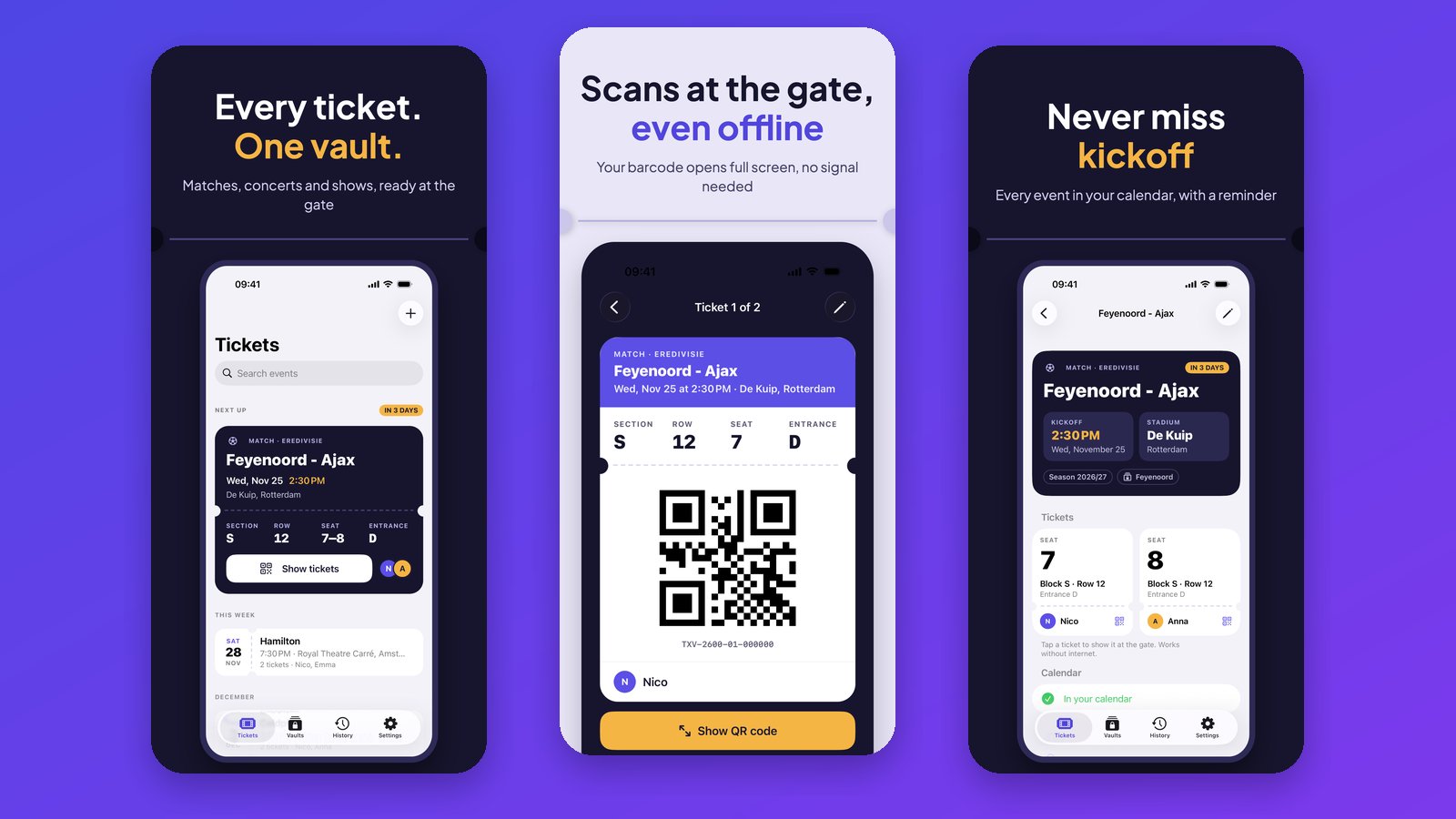
I built TixVault because the search for a ticket always seemed to start at the gate. It runs on iPhone and iPad, and the update that came out this week redraws every ticket as a real ticket card, with the match, the date and your seat at a glance. This is how it covers the steps above:
- One list, next match on top. Import the PDF from Files, a screenshot from Photos, or paste it from the clipboard. TixVault reads the event, date, venue, section, row, seat and entrance on the device, and you check the scan before it is saved.
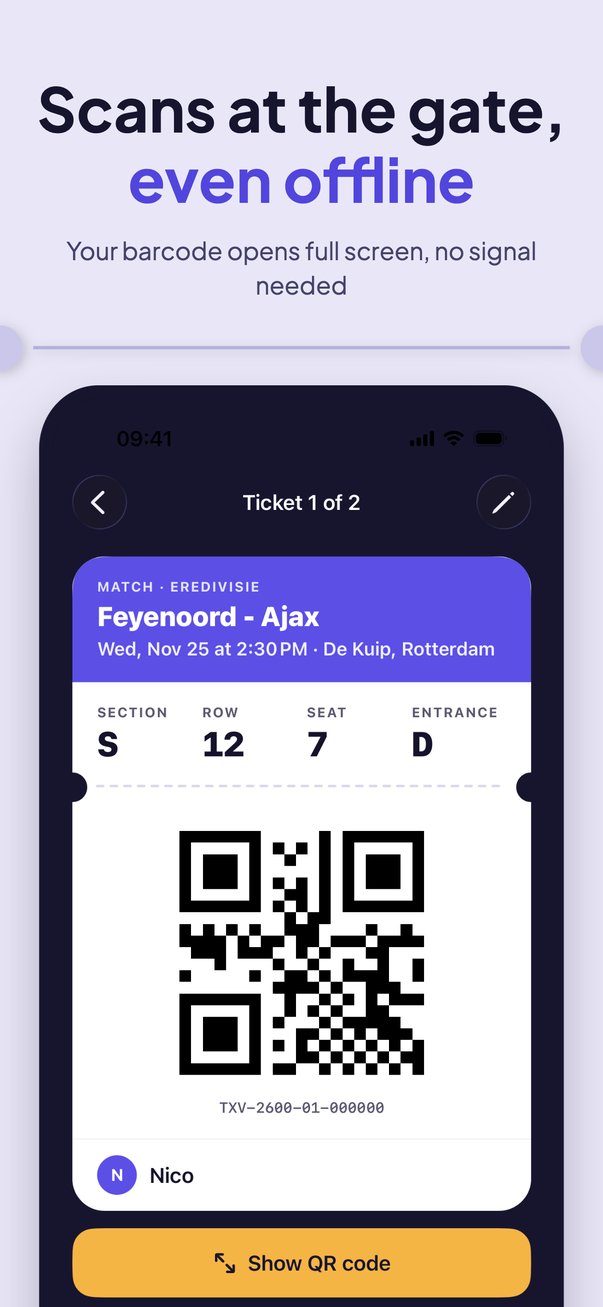
- Works without internet. The ticket, the barcode and the original file are stored on the device. Tap Show barcode and the screen goes to full brightness with nothing but the code. Airplane mode on, it still shows.
- The original, always. Show ticket displays the PDF or screenshot exactly as it was, pinch to zoom included, if a steward wants to see the whole ticket.
- Every seat, every guest, named. A PDF with four seats becomes one match with four tickets, each with its own section, row, seat, entrance and the name of the person using it.
- In your calendar. One tap creates the calendar event with the stadium as location and every seat in the notes, with an alarm beforehand and a reminder to leave in time.
- The whole group, one vault. Share a vault through iCloud, by invitation, and everyone in it has the same tickets on their own phone, offline, before anyone has to forward anything.
- The match afterwards. Three hours after kickoff the match moves to History, where you add the score, a few lines and your photos, grouped per season.
Your tickets are stored on your device and in your own iCloud account. There is no niApps account, there are no ads, and the ticket is read on the phone itself.
Where it does not fit: TixVault is for PDF and print-at-home tickets and screenshots of tickets with a fixed barcode. Tickets that only work inside the official app, such as most club apps and the UEFA Mobile Tickets app, cannot be stored by any other app as a working ticket; show those in the official app. You can still import a screenshot of one as a keepsake for the diary. It runs on iPhone and iPad only, with no Android or web version.
Frequently asked questions
What should I bring to a football match?
Your ticket ready on your phone or on paper, the ID the ticket is linked to, a fully charged phone, a payment card, clothes for the weather and at most a small bag. Check the stadium rules of the home club before you go, because bag sizes and banned items differ per stadium.
How early should I get to a football stadium?
Aim to be at your entrance 45 to 60 minutes before kickoff, and earlier for a big European match or a sold-out game. The gates usually open between one and two hours before kickoff, and security checks and ID checks make the queues longer close to the start.
Can I show a screenshot of my football ticket?
It depends on the barcode. A PDF or print-at-home ticket has a fixed barcode, so a clear copy of it scans. Tickets in an official club or competition app often have a barcode that refreshes every few seconds, and a screenshot of those does not scan at the gate; you must show them in that app.
What if my phone has no signal at the stadium?
Make sure the ticket does not need one. Save a PDF ticket on the phone itself, and open an app ticket once at home so it is stored in the app. Close to kickoff the mobile network around a stadium is often overloaded, so anything that still has to load can fail.
Do I need ID to go to a football match?
Often, yes. Many tickets are in your name, and stewards may check that your ID matches, especially at European matches and in away sections. Bring the passport or identity card you used when you bought the ticket, and check the club’s match information for the exact rule.
What size bag can I take into a football stadium?
At many European stadiums the limit is about A4 size, and some allow no bag at all in the away section. There is not always a place to leave a bag that is too big. Check the home club’s stadium rules, and bring as little as you can.
How do I give a football ticket to a friend?
Use the method the seller allows. A ticket in an official app is usually passed on with a transfer function in that app, and some clubs require the friend’s name or membership. A PDF ticket can be sent as the file. Never post a readable barcode online before the match, because whoever scans it first gets in.
Which iPhone app keeps PDF match tickets ready offline?
TixVault is a ticket wallet and event diary for iPhone and iPad. It imports a ticket as a PDF from Files, a screenshot from Photos or from the clipboard, reads the event, date, venue, section, row, seat and entrance on the device, and shows the barcode full screen without internet at the gate. It can add the match to your calendar with a reminder, and vaults are shared with the people you go with through iCloud. It is for PDF and print-at-home tickets; barcodes that refresh inside an official ticketing app cannot be stored as a working ticket.