Genealogy · Combining research
How to Merge Two Family Trees Without Losing Either One
Your mother’s side and your father’s side. Your own research and a cousin’s. Sooner or later two family trees turn out to share the same people. Here is how to combine them without a mess of duplicates, and why you may not want a single tree at all.
By Nico Jansen, maker of Gramps2··15 min read
🇳🇱 Lees dit artikel in het Nederlands →🇩🇪 Diesen Artikel auf Deutsch lesen →🇫🇷 Lire cet article en français →🇪🇸 Leer este artículo en español →🇮🇹 Leggi questo articolo in italiano →🇵🇹 Ler este artigo em português (Portugal) →🇧🇷 Ler este artigo em português (Brasil) →
The short answer
To merge two family trees, back up both as GEDCOM files, make the people they share match in name and date of birth, import one tree into the other, and resolve each duplicate person by checking dates, parents and places. Ancestry and the MyHeritage website have no button that merges two trees, so you either combine them in a desktop program or keep them as separate trees in an app that joins them where the same person appears.
The seven steps:
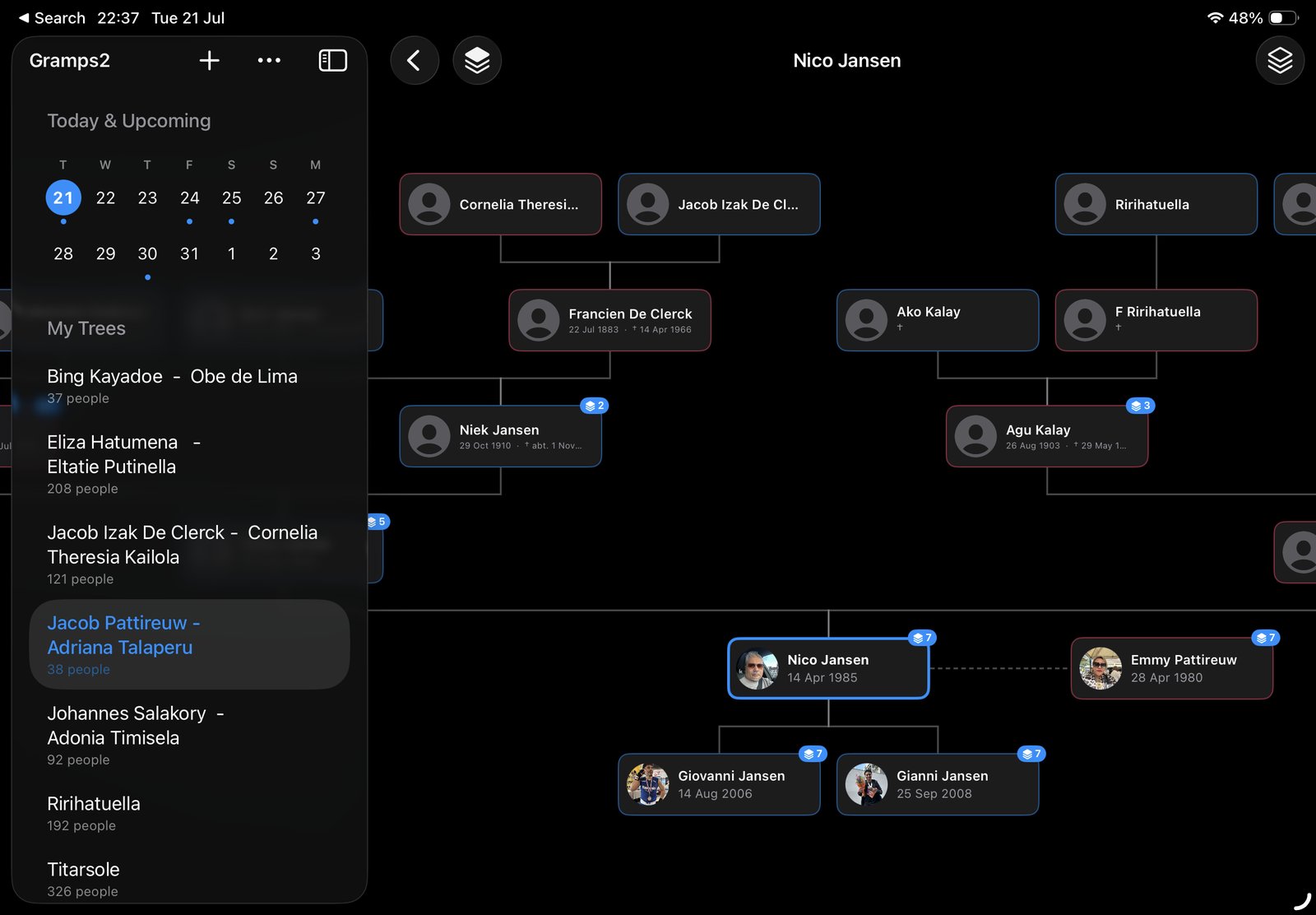
I keep eight family trees. Each one is a family line that someone in the family researched: a great-grandfather and his wife at the top, a few hundred descendants below. Most of them are Moluccan families, and families like that marry into each other. So the same people turn up in more than one tree. I am one of them. In the screenshot below, the small badge with a 7 on my own card means I appear in seven of my trees. So do my partner and our children.
Seven copies of one person are seven places where a birth date can be wrong. The obvious fix is to merge everything into one big tree, and that is where most people get stuck: the genealogy websites do not merge trees, importing one file into another doubles everyone who was in both, and the result is a tree that holds every family at once, while each relative only cares about their own side.
This guide covers both routes. How to merge two trees properly when you want one file, and how to keep several trees and let them join where they meet, which is what I do now.
Why would you merge two family trees?
You merge two family trees when they share people: two sides of one family, two researchers working on the same line, or an old file that overlaps with your current tree. The overlap is the reason to combine them, and also the reason it is hard.
These are the situations people run into most:
| Situation | Where the trees meet | What usually goes wrong |
|---|---|---|
| Your mother’s side and your father’s side | You, your siblings and your parents’ marriage | Few overlaps, so the merge is easy; the combined tree just gets big |
| Your tree and your partner’s tree | The two of you and your children | Your children end up twice, once in each tree |
| Your research and a cousin’s GEDCOM file | A shared grandparent or great-grandparent and everyone below | Dozens of duplicates, with small differences in spelling and dates |
| Two families that intermarried for generations | Many couples, in several generations | The same person in many trees, each copy with different details |
| An old file and a newer tree of your own | Almost everyone | Old mistakes come back that you had already fixed |
Notice the difference between the first and the fourth row. Merging your mother’s and father’s side touches a handful of people. Merging two trees of intermarried families touches dozens, spread over generations. The more overlap, the more work, and the more a careful method matters.
Can you merge family trees on Ancestry, MyHeritage or FamilySearch?
None of the three big genealogy websites has a button that merges two of your trees into one. Each has a workaround, and each works differently.
| Platform | Merge two trees? | What you can do instead |
|---|---|---|
| Ancestry | No. Its help center says merging trees is not currently possible. | Merge duplicate people inside one tree, add people from another tree, or download a GEDCOM file and combine trees in a desktop program. |
| MyHeritage | Not on the website. | Its desktop program Family Tree Builder can merge two tree projects by GEDCOM import. People in both trees are not combined automatically, so duplicates are removed by hand. |
| FamilySearch | Not needed: there is one shared tree for everyone. | You merge duplicate people in that shared tree, and can copy information from your own GEDCOM file into it. |
| Desktop programs (Gramps, RootsMagic and others) | Yes, by importing one file into the other. | Run a duplicate search after the import and merge each pair you have checked. |
FamilySearch is a special case. Because it is one tree for the whole world, two researchers never have two trees to merge. They do have the same person entered twice, and merging those duplicates is a daily job there. The same care applies: merge only when the dates and parents agree.
In practice, people who want one combined tree on a website do it in three moves. Download both trees as GEDCOM files, merge them in a desktop program, and upload the result as a new tree. Our comparison of genealogy software lists the desktop programs that can do the middle step.
What happens when you merge two GEDCOM files?
When you import one GEDCOM file into another tree, every person in it is added as a new person, so everyone who was already in your tree is now in it twice. The import does not know that your “Johannes de Vries, born 1890” and the cousin’s “J. de Vries, b. abt 1890” are one man.
A GEDCOM file gives each person an identifier, such as @I123@, that only means something inside that one file. Two files from two programs or two researchers use different identifiers for the same person. The program that imports them has nothing to go on but names, dates and places, and those are exactly the things two researchers tend to write differently.
What you get after an import, in a typical case:
- Two copies of every shared person. Each with the relatives from its own file. One copy has the children, the other has the parents.
- Duplicate families. The same marriage twice, sometimes with two different dates.
- Duplicate places and sources. “Ambon” and “Ambon, Moluccas” become two places.
- No photos. GEDCOM does not carry the photos themselves, only references to them. Plan to add photos again after the merge.
Desktop programs then offer a duplicate search that proposes pairs to merge. Users of the free desktop program Gramps describe the same experience you will have anywhere: the tool finds candidates, but merging hundreds of people who are in both trees is still hand work. Budget an evening per few dozen duplicates, and do not rush it.
Merge into one tree, or keep the trees and link them?
You can combine family trees in two ways: merge them into a single file, or keep them as separate trees that are joined wherever the same person appears. Both show the same family. They differ in what you can do with them afterwards.
| One merged tree | Separate trees, linked | |
|---|---|---|
| What you have | One big file | Several trees, each readable on its own |
| Duplicates | Must be resolved before the tree is usable | Recognized and joined at the shared people |
| Undoing it | Hard: the original trees no longer exist | Easy: the trees were never mixed |
| Sharing with relatives | Everyone gets everything | Each relative gets the tree that is theirs |
| Seeing the whole family | Yes | Yes, in a combined view |
| Fixing a date | Once | Once, if the program keeps the copies in step |
| Best for | Two small trees with a few shared people | Intermarried families, trees from several researchers |
The last row is the important one. If your father’s side and your mother’s side meet only at your parents’ marriage, one merged tree is simple and fine. If, like mine, your families married into each other for generations, one big tree becomes a tangle. A person can then be your grandmother’s cousin and your grandfather’s niece at once, and the tree is no longer about any one family.
Separate trees also match how families actually think. A relative asks for “grandfather’s tree”, not a file with two thousand people from six families. A cousin who researched one line wants to keep working on that line. Linked trees let everyone keep their own tree, while you still see how they all connect.
How do you know two records are the same person?
Two records are the same person when the full name, the date of birth and the parents agree; a name alone is never enough. Getting this right is the whole difference between a clean merge and a tree with invented ancestors.
Many families reuse names. A first son is named after his grandfather, a daughter after her grandmother, and in a small village the same name can belong to three men in three generations. Two cousins called after the same grandfather may be born a year apart. Merge them and you give one man two sets of parents.
Compare these, in this order:
| Check | Agrees | Watch out for |
|---|---|---|
| Surname | Same surname, or a known spelling variant | Maiden name in one tree, married name in the other |
| First names | Same first name, or a call name the family used | An initial (“J.”), a short form (“Magda” for “Magdalena”), names in a different order |
| Date of birth | Same full date, or a year-only date in the same year | Baptism dates entered as birth dates, “about 1890” |
| Parents | Same father and mother | One tree knows the parents, the other does not |
| Partner and children | Same spouse, overlapping children | A second marriage that only one tree has |
| Place | Same village or town | Old and new place names, a district versus a village |
The rule I use: a match needs the same name and a date of birth that agrees where both trees know it. If one tree has only a year and the other a full date in that year, that is a match, and the merge should keep the full date. If the dates disagree, it is two people until a record proves one tree wrong. Fix that tree first, then merge.
When a record is missing a date of birth, do not merge on the name. Find the date in a birth, baptism or marriage record first. Our guide on how to start a family tree lists where to look.
How to merge two family trees in 7 steps
Merging two family trees takes seven steps: back up both, choose merged or linked, find the overlap, make it match, import, resolve duplicates, and then decide who sees what. Most of the work is in steps 3, 4 and 6.
1. Back up both trees
Export each tree as a GEDCOM file before you change anything, and name the files with the date: “family-tree-2026-11-29.ged”. A merge is the one operation in genealogy that is hard to undo. With the backups, a failed merge costs you an evening, not your research.
2. Decide: one tree, or linked trees
Use the table above. Two trees with a few shared people: merge. Families that intermarried, trees that other people keep working on, or trees you want to share with different relatives: keep them separate and link them.
3. Find where the trees meet
Write down the people who are in both trees. Usually this is one couple, their children and the generations below them. For intermarried families it can be several couples. This list is your work list: everyone not on it is simply added, and only these people need to become one.
4. Make the shared people match
Go through the list and compare each person in both trees. Same spelling of the name, a complete date of birth in both, the same parents. Where the trees disagree, look at a record and correct the tree that is wrong. This step feels slow, but every person you match now is a duplicate you will not have to untangle later.
5. Bring the second tree in
For one merged tree, import the second GEDCOM file into the main file in your desktop program. For linked trees, import it as a tree of its own next to your existing trees. Either way, open the result and look at a family you know well before you go on.
6. Resolve duplicates one by one
Run the duplicate search, or walk through your list from step 3. Merge a pair only when the checks in the previous section agree. Where both copies have details, keep the more complete one: a full date over a year, a place over an empty field. Keep a note of what you merged and why. Linked trees skip most of this step, because a program that joins trees on name and date of birth does it for you.
7. Decide who sees which tree
A combined tree holds the details of more living people than either tree did. Before you share it, read the next section.
Who should see which tree?
Share each tree with the relatives it belongs to, not the whole combined family with everyone. Most genealogy programs share per tree, which is another reason to keep trees separate.
When you merge your father’s and mother’s sides into one tree, every relative you share it with sees both sides, including the living people on the side they have never met. With separate trees you can share your father’s tree with the cousins on that side, your mother’s tree with hers, and keep a tree you are still researching to yourself.
- Living people first. Names, birthdays and addresses of living relatives are personal data. Share them only with family, never on a public website without asking. Our guide on keeping a family tree private goes into this.
- One tree, one group of editors. If several people edit, agree who does what. A tree is easier to keep correct when everyone working on it knows that family.
- Ask before you combine someone else’s research. A cousin who sent you their file may not want it mixed into a tree that others can see. A short message avoids a long argument.
For the ways to share and what each one costs in control, see how to share a family tree with your family.
Several trees, joined automatically, with Gramps2
I built Gramps2 as a family tree builder for iPhone, iPad and Mac, and the way it handles several trees came straight from my own seven copies. Here is how the steps above work in it:
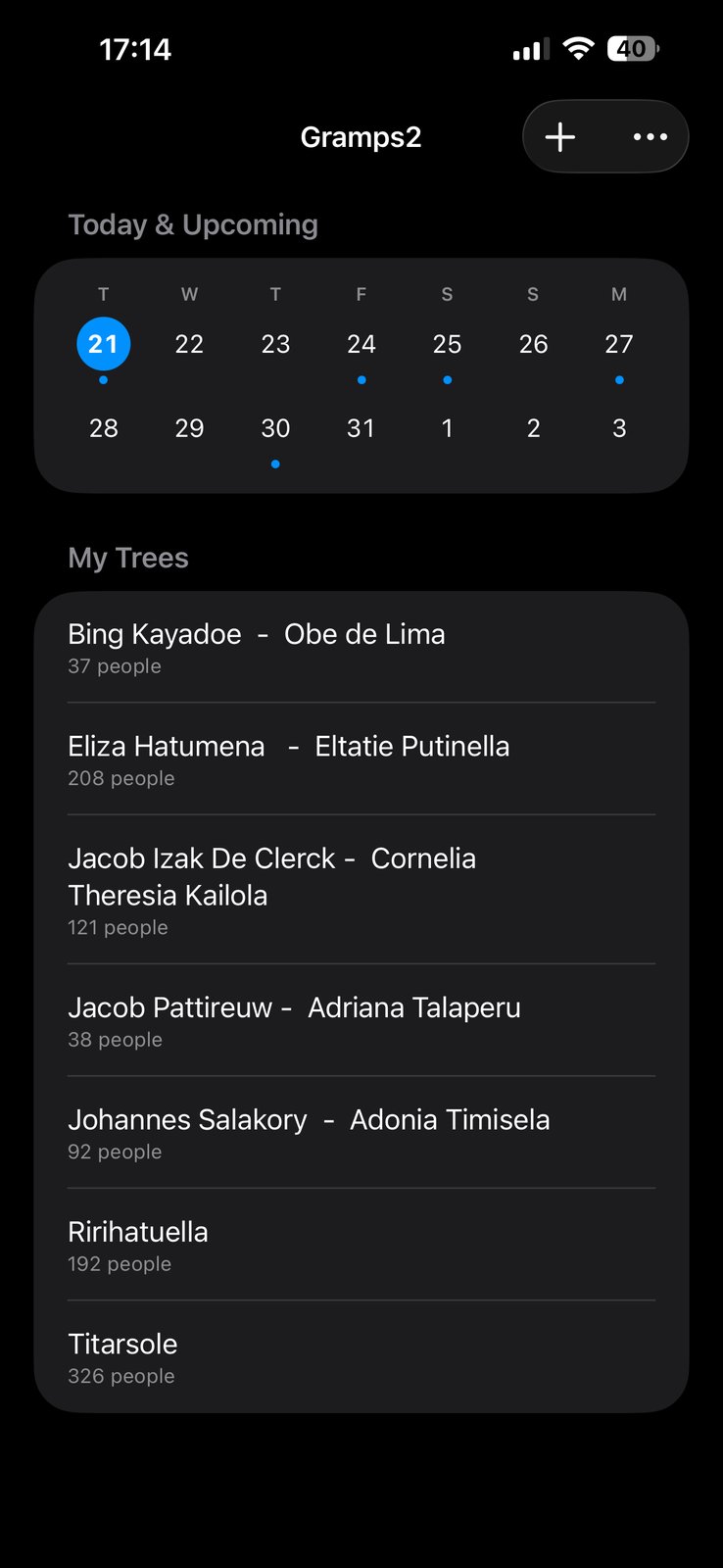
- As many trees as you need. Keep a separate tree for each family line, each with its own people count, and search everyone by name. A GEDCOM file from a cousin, Ancestry or MyHeritage comes in as a new tree of its own.
- Joined where the same person appears. Someone with the same first name, surname and date of birth in two of your trees is treated as one person. The All Trees view joins your trees at those people into one combined chart, and a small badge on a card shows in how many of your trees that person appears.
- Fix it once. Change that person’s details, photos or profile picture, and the change follows to their copies in your other trees. People without a date of birth are never joined, so namesakes stay apart.
- Copy to Other Trees. For a copy that is missing dates, open the person’s More menu and choose Copy to Other Trees. Gramps2 finds the same person in your other trees, also under a nickname or an initial, and shows tree by tree what would change before anything is copied. You can bring photos, documents, children and grandchildren along.
- Share the tree, not the family. Sharing is per tree: invite the cousins on one side to that side’s tree through iCloud, and your other trees stay private. Everyone you invite can edit, and changes sync to all participants.
- The whole family on one screen. Stream the chart to an Apple TV with AirPlay and switch between a single tree and all your trees combined.
Your trees are stored on your devices and in your own iCloud, not on niApps servers. Gramps2 is available in English, Dutch, German, French, Spanish, Italian and Brazilian Portuguese.
Frequently asked questions
Can you merge two family trees on Ancestry?
No. Ancestry’s help center says it is not currently possible to merge trees. You can merge duplicate people inside one tree, add people from one tree to another, or download one tree as a GEDCOM file and combine the two in a desktop program.
Can you merge two family trees on MyHeritage?
Not on the website. MyHeritage’s help center points to its desktop program Family Tree Builder, which can merge two tree projects through a GEDCOM import. People who appear in both trees are not combined automatically, so duplicates have to be removed by hand, and MyHeritage advises against it for large trees.
How do I merge two GEDCOM files?
Import both files into one genealogy program, then search for duplicate people and merge each pair after checking dates, parents and places. Desktop programs such as Gramps and RootsMagic have a duplicate search for this. The alternative is to import each file as its own tree in an app that joins trees where the same person appears.
Will merging family trees create duplicates?
Almost always. An import gives every person a new identity, so everyone who was in both trees is in the result twice. Plan time to resolve them, and do it one pair at a time.
How do I combine my mother’s and my father’s family tree?
The two trees meet at you and your siblings, and at your parents’ marriage. Make sure your parents and their children have the same names and full dates of birth in both trees. Then either merge the files and remove those few duplicates, or keep two trees and use a program that joins them at the shared people.
What if two relatives in different trees have the same name?
Treat them as two people until the evidence says otherwise. Compare the full date of birth, the parents, the spouse and the place. In families where children are named after grandparents, the same name in the same village can belong to three generations.
Can I share only one of my family trees?
In most programs, yes, because sharing works per tree. On Ancestry you invite people to a specific tree, and in Gramps2 you share a tree through iCloud with the people you invite, while your other trees stay private.
Which family tree app joins several trees on iPhone, iPad and Mac?
Gramps2 keeps several family trees side by side and joins them where the same person appears: someone with the same name and date of birth in two trees is treated as one person, the All Trees view shows the combined family, and changes to that person follow to your other trees. Each tree can be shared through iCloud with different family members.